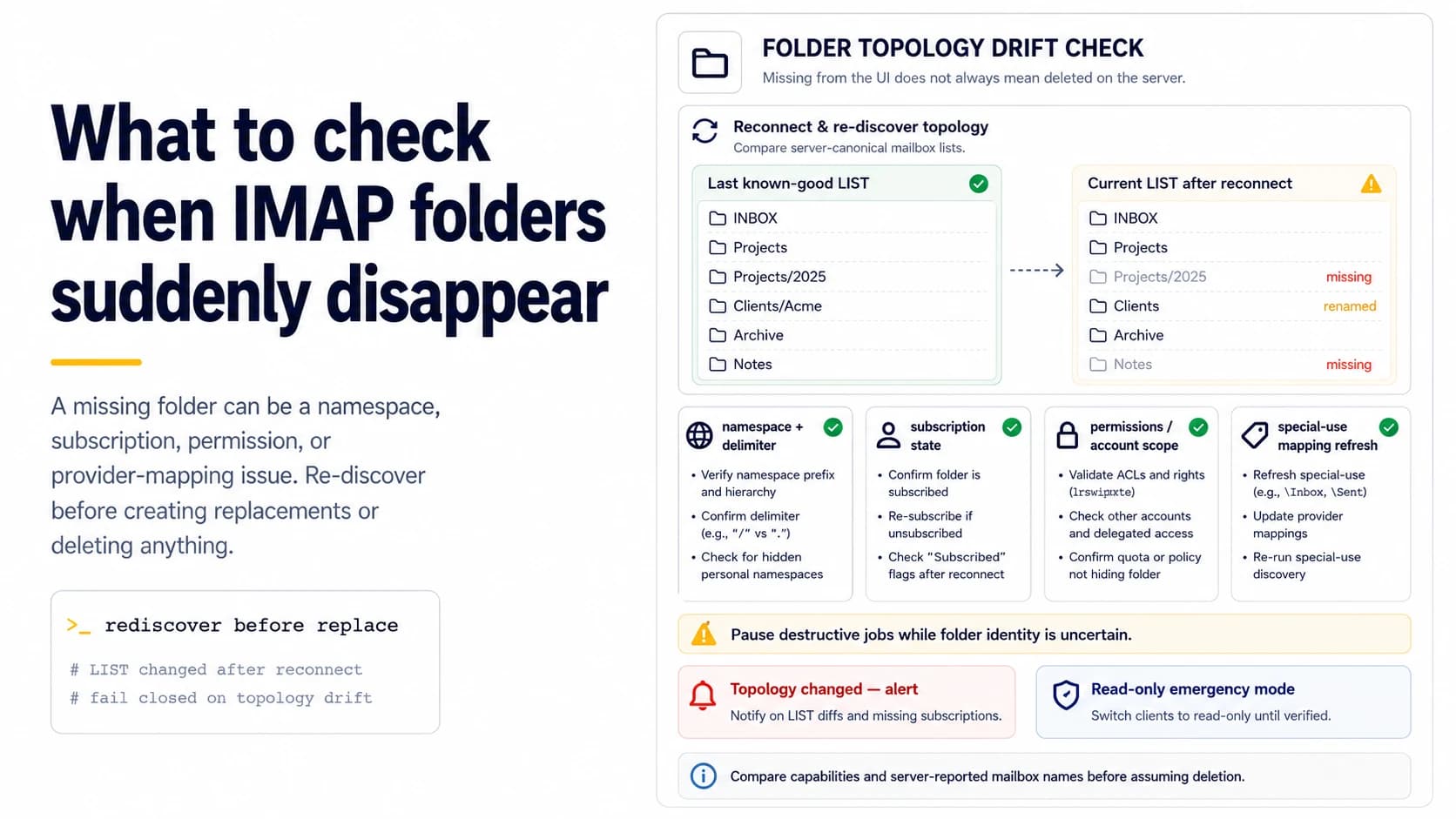
Missing from the UI does not mean deleted on the server
When a connector suddenly cannot find a folder, resist the instinct to create it again. IMAP mailbox visibility can change because of namespace, subscription, permissions, special-use mapping, or provider configuration. First capture the error and rerun capability and LIST discovery. Compare the current mailbox set with the last known-good snapshot. A folder renamed or moved under a namespace may still contain every message; creating a replacement with the old English name can make the account more confusing.
Compare namespace and delimiter changes
Providers can expose hierarchical mailbox names with prefixes and delimiters that differ between accounts or configurations. If the connector previously used `INBOX/Trash` and the server now reports another hierarchy, hard-coded paths will fail even though the semantic trash folder still exists. Store the server-reported mailbox name exactly and map it to an internal role. When the mapping changes, log the old and new identifiers so the incident is explainable.
Check subscription separately from existence
Some clients and libraries distinguish mailboxes that exist from those currently subscribed or shown. A folder can disappear from one listing mode while remaining accessible. During diagnosis, use the appropriate discovery commands and library options to inspect both. Do not treat a subscription toggle as permission to recreate or move data. If the outbound worker only needs Inbox and Junk roles, it should resolve those roles from discovery rather than assume every visible UI folder is part of its operating set.
Re-evaluate permissions and account scope
Administrative changes, shared-mailbox permissions, OAuth scopes, or provider-side security settings can reduce what the connection is allowed to list or select. Compare authentication identity and scopes with the last successful connection. A newly unauthorized folder can look identical to a missing folder at a shallow error layer. Fix access first; creating a same-named mailbox under the wrong identity does not restore the original data.
Refresh special-use mapping after reconnect
If the server advertises special-use roles, remap them when the connection is re-established. Do not cache `Junk -> Spam` forever. Providers and account language settings can change display names while preserving role metadata. If special-use information is unavailable, require a provider adapter or explicit configuration for destructive operations. Reply discovery can often continue from Inbox while cleanup tasks remain paused until ambiguous folders are resolved.
Protect data by failing closed
A missing folder incident is a poor time to run automatic cleanup, bulk moves, or “repair” creation. Disable destructive jobs and keep a diagnostic snapshot of capabilities, LIST results, namespace information, and errors. Continue only operations whose target mailbox identity is certain. This containment rule turns a mysterious provider change into a temporary feature outage instead of a data-loss event.
Build a reconnect test that detects topology drift
On each reconnect, compare key mailbox roles with the stored mapping. If Inbox disappears, UIDVALIDITY changes unexpectedly, or the trash/junk role resolves to a new path, raise an operational event and revalidate before mutation. A small agency does not need a complex monitoring platform; a structured log and alert on topology drift is enough to catch the condition before a reply worker or cleanup script starts acting on stale assumptions.
Check whether the mailbox was recreated by comparing UIDVALIDITY
A folder can keep the same display name while representing a new mailbox instance. When reconnecting after a migration or server-side repair, SELECT or EXAMINE the mailbox and compare UIDVALIDITY with the stored value. RFC 9051 uses this value to signal whether previously saved UIDs still refer to the same message set. If UIDVALIDITY changed, do not trust old UID-based reply or cleanup state even if the folder name looks unchanged. Reconcile the mailbox before resuming automated actions. This check catches a deeper class of “folder disappeared” incidents where the path returned but the underlying message identity epoch changed.
Fail closed on topology drift and require rediscovery
When LIST results, namespace, delimiter or special-use roles differ from the last known-good snapshot, disable destructive mailbox actions until discovery succeeds. Continue to log the connection and alert the operator, but do not guess that a similarly named folder is the old target. The same rule applies when a folder is hidden by subscription state or permission changes. A read-only discovery pass can compare available mailboxes, special roles and UIDVALIDITY before reply detection or cleanup resumes. This turns provider-side topology changes into an explicit reconciliation event instead of letting stale cached paths mutate the wrong mailbox. For a small outbound stack, conservative failure is preferable to silent data loss.
Keep a read-only emergency mode for reply visibility
If mailbox topology changes and destructive operations are disabled, the system can still preserve visibility by falling back to a read-only scan of the confirmed inbox when possible. Fetch recent headers and bodies with PEEK, log candidate replies for manual review, and avoid moves, deletes or flag changes until folder discovery is repaired. This degraded mode is useful during provider incidents because it prioritizes not missing a recipient response while refusing to guess about vanished Trash or Junk mappings. Once namespace and special-use roles are confirmed again, normal automation can resume from the saved UIDs and reconciliation log.
Compare account capabilities after provider changes
If folders vanish immediately after a mailbox provider migration, compare the CAPABILITY response and account permissions with the previous connection as well as the folder list. Features or extensions that the old server supported may no longer exist or may require a different authentication scope. Record that capability snapshot during onboarding so a later incident has a known-good comparison. Folder topology problems are easier to diagnose when the system can show that both the namespace and the server feature set changed at the same cutover.
Snapshot folder topology after a successful reconnect
After a repaired connection is confirmed, save the new folder list, namespace, delimiter, special-use roles and UIDVALIDITY values as the next known-good snapshot. Future reconnects can compare against that baseline and alert only on meaningful drift. This avoids permanent “incident mode” while preserving the evidence needed to detect another provider-side change. The snapshot should be account-specific because two mailboxes at the same provider can still expose different subscriptions or permissions.
Field checklist
- Rerun capabilities and LIST before assuming a folder was deleted.
- Compare namespace, delimiter, and exact server-reported mailbox names.
- Check subscription and permissions separately from existence.
- Refresh special-use mappings after reconnect.
- Pause destructive jobs while folder identity is uncertain.
- Alert when reconnect discovery differs materially from the last known-good topology.
Primary sources
Standards and provider policies can change. These links are the reference points used for this field note.
- RFC 9051 — IMAP4rev2IETF / RFC Editor — Mailbox flags, UIDs, BODY.PEEK and IMAP4rev2 behavior.