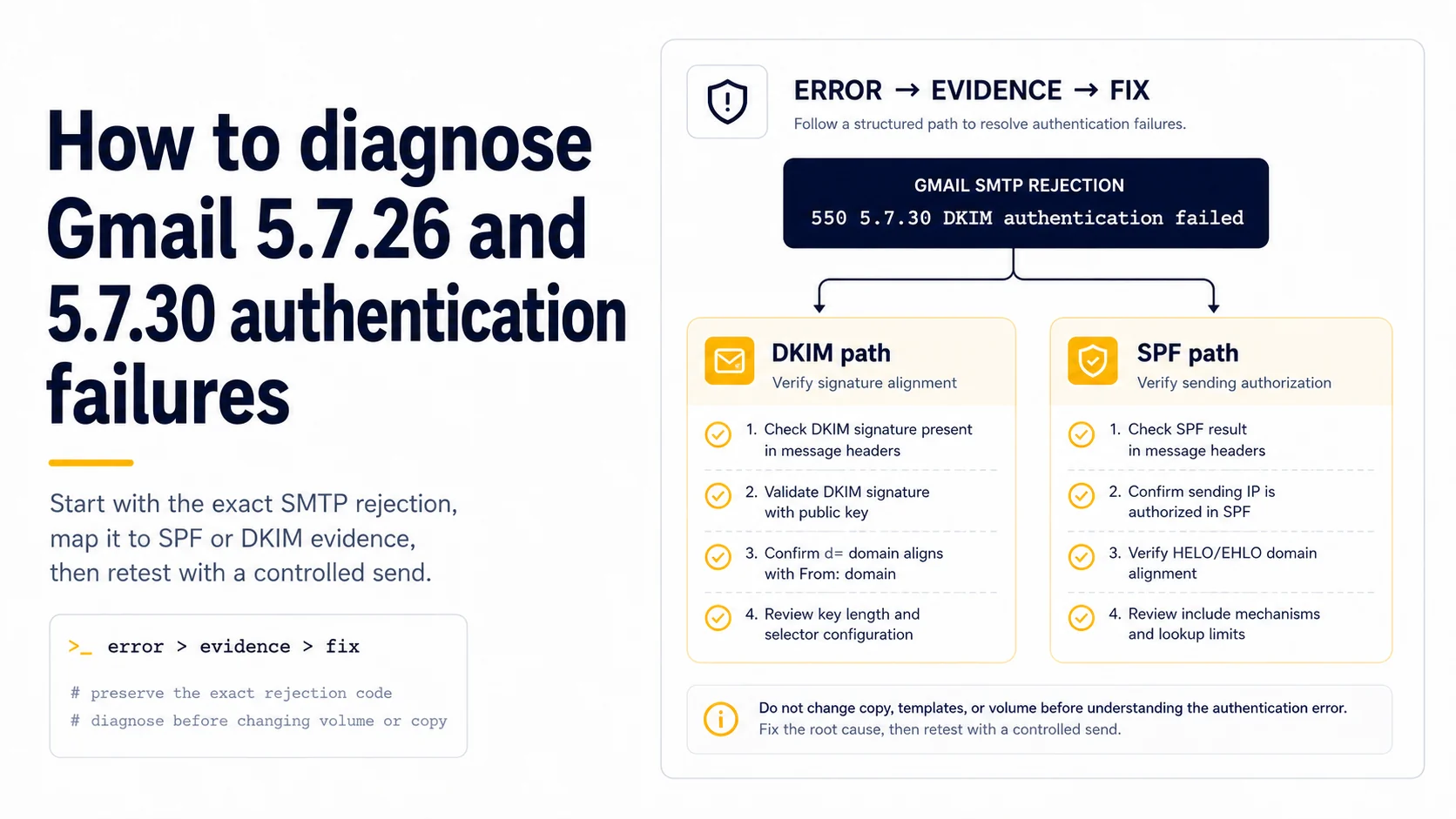
Start with the exact Gmail rejection, not a generic spam theory
Gmail authentication rejections such as 5.7.26 or 5.7.30 give you a much narrower problem than “my email went to spam.” Preserve the complete SMTP response, recipient domain, timestamp, sending mailbox, and message identifier before retrying. Google documents sender authentication requirements and surfaces authentication-related errors when messages do not meet them. If the server explicitly points at SPF, DKIM, or DMARC, changing subject lines or spacing sends through the day is not the first move. Fix the authentication evidence the receiver has already identified.
For a DKIM-specific rejection, inspect the actual signature
Open a message generated by the same sending path and record its `d=` signing domain and `s=` selector. Query the corresponding `selector._domainkey.signing-domain` TXT record from authoritative DNS. A missing record, stale selector, malformed key, or signer using a different private key can all produce DKIM failure. If a provider dashboard says “DKIM configured” but the message carries another selector, trust the message. The receiver validates what was sent over SMTP, not what a setup wizard intended to send.
For SPF failures, follow the envelope identity
Check the Return-Path and Authentication-Results to learn which domain SPF evaluated. Confirm that the connecting sender is authorized by that domain's single SPF policy and that the policy does not return a permanent error because of multiple records or excessive lookup processing. Avoid adding IP addresses guessed from one message if the provider documents a supported include mechanism. Also remember that SPF pass alone may not satisfy DMARC when the authenticated domain is not aligned with the From domain.
For DMARC failures, map alignment explicitly
Write three columns: visible From domain, SPF-authenticated domain, and DKIM `d=` domain. Mark pass/fail and alignment for the latter two. This small table usually makes the problem obvious. A third-party sender can pass its own SPF and DKIM while the brand From domain has no aligned path, causing DMARC failure. Repair the vendor's supported custom authentication configuration rather than weakening policy reflexively. If the domain recently moved providers, compare with a pre-migration header to see which identity changed.
Retest with one controlled message after each structural fix
Do not resume the campaign with a fifty-message batch to see whether the problem disappeared. After the DNS or signing change is visible, send one controlled message through the exact failing route and inspect its received Authentication-Results. If it passes, repeat to another relevant receiver before restoring normal volume. If it still fails, the small test preserves a clean diagnostic loop. Large retries create more receiver-facing failures while telling you little more than a single carefully inspected message would.
Separate a rejection from an inbox-placement problem
A 5.x.x SMTP rejection means the receiver did not accept that message for delivery. Spam-folder placement happens after acceptance and has different evidence. Mixing the two creates bad troubleshooting. For a hard authentication rejection, solve the protocol identity problem first. Once messages are accepted and authenticate correctly, then evaluate recipient quality, complaint signals, content relevance, and provider-specific filtering. A passing DKIM test does not guarantee inbox placement, but a rejected DKIM message never reached the stage where inbox placement could be assessed.
Keep a compact incident record for future migrations
Save the rejection text, the raw test-message headers, DNS query output, the configuration change, and the first passing post-fix header. That record becomes more valuable than a generic checklist the next time nameservers, mailbox providers, or sending APIs change. It also prevents repeated folklore fixes: the team can see that the last 5.7.30 incident was a selector mismatch, for example, rather than assuming every future Gmail failure has the same cause.
Distinguish Gmail temporary enforcement from permanent rejection
Gmail publishes both 4.7.x temporary failures and 5.7.x permanent blocks for several sender requirements. For example, SPF or DKIM non-compliance can appear first as a 421 rate-limited response in the 4.7 range, while the corresponding 550 response in the 5.7 range is a permanent rejection. Capture the full SMTP code and diagnostic string; do not reduce both to “Gmail bounce.” A temporary failure belongs in a retry-aware queue with a hold on further scaling, while a permanent authentication block requires a configuration fix before the same message is attempted again. The difference matters during an incident because an aggressive retry loop can turn a correct temporary signal into a larger traffic spike.
Use the code to narrow the layer before touching DNS
Gmail 5.7.26 is commonly associated with unauthenticated mail, while 5.7.27 and 5.7.30 target SPF and DKIM requirements for bulk senders, and later codes cover DMARC or alignment failures. Read the exact text supplied with the rejection because it often includes the failing method or domain. If DKIM is the named failure, query the selector from the rejected message; if SPF is named, trace the envelope domain and sending IP; if alignment is named, compare the authenticated domains with the From domain. This layered approach prevents a destructive troubleshooting pattern where SPF, DKIM and DMARC records are all edited at once. Fix one evidenced failure, send one controlled test, and preserve the before/after headers.
Retest through the exact production path
After a DNS fix, send the validation message through the same account, provider, routing rule and envelope path that produced the Gmail rejection. A test from a different mailbox or web interface can pass while the broken worker still signs with another selector or uses a different return path. Save the new Authentication-Results and Received headers next to the rejected sample and compare them line by line. The incident is closed only when the failing production path produces the intended SPF, DKIM and DMARC results. This avoids a common false recovery where the DNS checker turns green but the live sender remains misconfigured.
Field checklist
- Save the full Gmail SMTP response before retrying.
- Match a DKIM error to the `d=` domain and `s=` selector on an actual message.
- Follow the Return-Path identity for SPF and verify one coherent SPF policy.
- Map DMARC alignment between authenticated domains and the visible From domain.
- Retest with one controlled message before restoring campaign traffic.
- Do not confuse SMTP rejection with later spam-folder placement.
Primary sources
Standards and provider policies can change. These links are the reference points used for this field note.
- Email sender guidelines FAQGoogle Gmail Help — Bulk-sender classification, enforcement and DMARC alignment details.
- RFC 6376 — DKIM SignaturesIETF / RFC Editor — DKIM signing and verification behavior.
- Gmail SMTP errors and codesGoogle Gmail Help — Temporary and permanent Gmail SMTP errors, including authentication and unusual-rate failures.