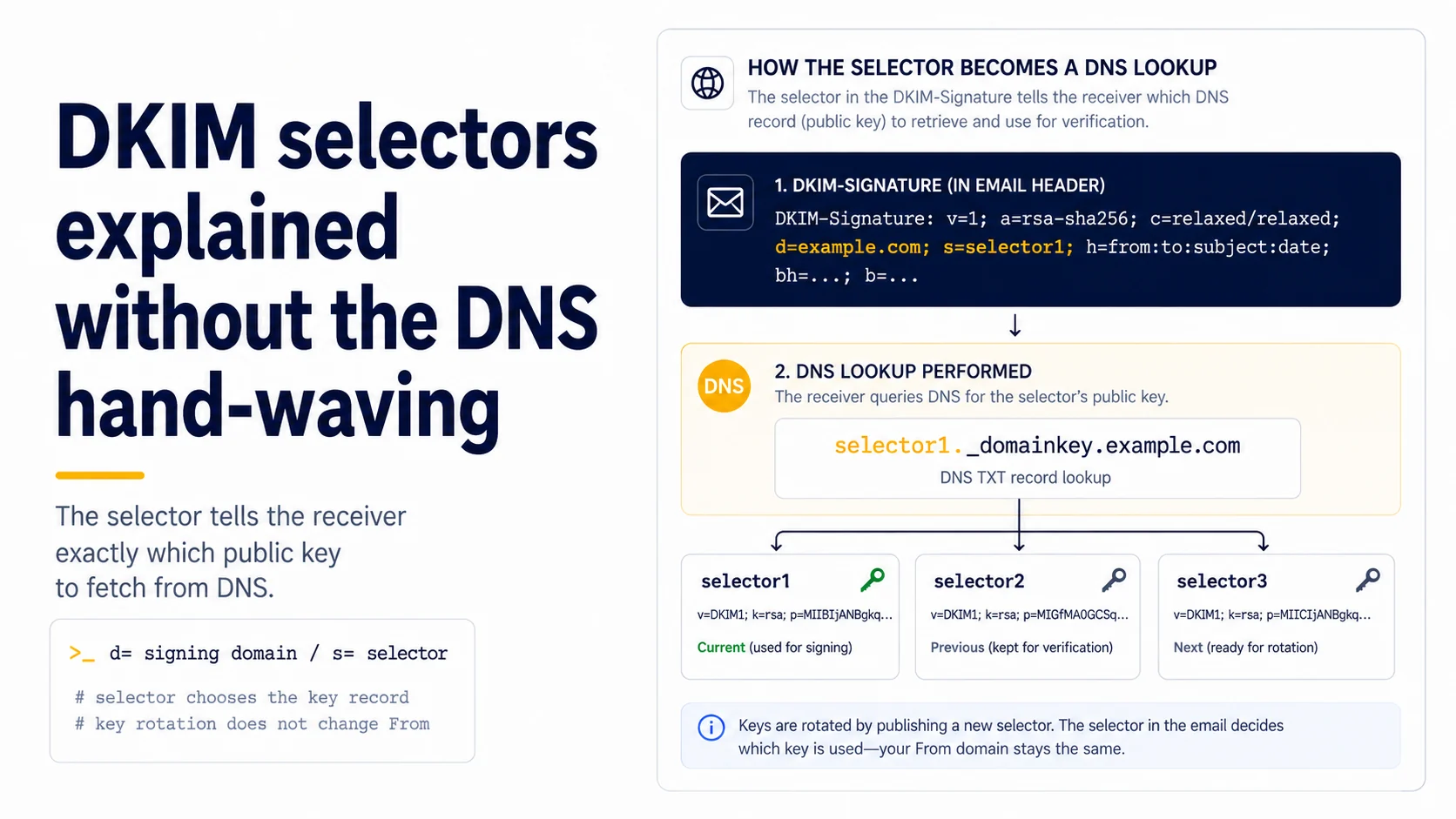
The selector is a DNS lookup key, not the mailbox name
A DKIM selector is simply the label a signer places in the `s=` tag of the DKIM-Signature header so a receiver knows which public key to request from DNS. If a message contains `d=example.com; s=selector1`, the receiver looks under `selector1._domainkey.example.com`. The visible From address can still be `hello@example.com`; the selector does not rename the mailbox and does not appear as the sender identity recipients interact with. Keeping those concepts separate makes DKIM debugging much faster.
Read the signature before touching DNS
When DKIM fails, begin with the message that failed. Open the raw headers and record the signing domain (`d=`), selector (`s=`), algorithm, and the receiver's Authentication-Results. Then query exactly the DNS name implied by `s=` and `d=`. This avoids guessing from a provider dashboard that may show a selector planned during setup but not the selector the active signer is actually using. A copied screenshot from last month is weaker evidence than a fresh message and the authoritative DNS answer it points to.
Why providers use selectors at all
Selectors allow a domain to publish more than one DKIM key without changing its From domain. A provider can sign with `s2026a`, introduce `s2026b`, verify that the new public key is available, and then switch signing traffic. The old record can remain during a transition while delayed mail is still in flight. This is the practical basis for key rotation. It also lets separate sending platforms use different keys under the same signing domain, which makes ownership and incident response clearer.
A selector record must match the private key doing the signing
Publishing a DKIM TXT record does not make mail signed. The sending system must hold the corresponding private key and place a valid signature on each message. If DNS contains a beautiful public key for `selector1` but the provider signs with `selector2`, receivers will query `selector2`; the first record is irrelevant to that message. Likewise, copying a public key from one environment while the signer uses a different private key produces verification failure. Always test the key pair through an actual signed message.
Distinguish DKIM pass from DMARC alignment
DKIM can pass for a domain that is not the same domain shown in the From header. DMARC then asks whether an authenticated domain aligns with the RFC5322.From domain according to DMARC rules. This matters with third-party platforms that sign using a vendor-owned domain unless custom signing is enabled. During setup, record both the cryptographic outcome and the domain relationship. “DKIM=pass” is a useful fact, but it is not the complete DMARC answer.
Rotate without creating an avoidable outage
A controlled rotation publishes the new selector's public key first, confirms it is visible from authoritative DNS, then changes the signer to the new selector. After sending test messages, verify that receivers can validate the new signature. Keep the old selector long enough for operational rollback and any delayed mail that was signed with the previous key. Only then remove it according to your provider's guidance. Reversing the order—switching the signer before DNS is ready—creates a predictable period where otherwise valid messages cannot be verified.
Debug selector problems with a four-line note
For a small outbound system, record four values whenever DKIM is suspect: From domain, `d=` domain, `s=` selector, and the DNS lookup result for `s._domainkey.d`. Add the receiver's reported DKIM result and timestamp. That compact evidence distinguishes missing DNS, wrong selector, wrong signing domain, and alignment problems without changing campaign copy or volume. It also gives you a reusable known-good baseline after provider migrations or nameserver changes.
Rotate selectors with overlap instead of replacement-in-place
RFC 6376 explicitly describes selectors as a way to support seamless key replacement. The safe sequence is to publish the new selector and public key, switch outbound signing to the new selector, leave the old public key available while older messages may still be verified, and only then retire the old record. Reusing the same selector name with a new key is discouraged because a verifier can no longer distinguish an old message signed by the former key from a forged message that fails against the replacement. For a small sender, the operational rule is simple: new key, new selector. Put the selector name and activation date in the change log so an authentication failure can be traced to a specific rotation instead of an ambiguous DNS record.
Read selector failures from the message outward
When DKIM fails, start with the actual DKIM-Signature header. The s= value tells you the selector and d= tells you the signing domain; together they form the DNS lookup under selector._domainkey.signing-domain. Query that exact name. If the record is missing, check whether the signer has already switched selectors or whether DNS was published under the wrong domain. If the record exists, compare the key material and verify that the provider is signing with the expected private key. Do not assume the selector should equal the mailbox name, provider name or a label seen in a setup guide. The signature is the authoritative clue for the message in front of you. This message-first habit is especially useful during migrations, where old and new selectors can legitimately coexist for a transition period.
Save the selector with each provider in your sender inventory
An authentication inventory should record more than “DKIM enabled.” For each sending path, store the visible From domain, DKIM signing domain, selector, provider, and the date the selector was first observed in production headers. During an incident, this lets the operator see immediately whether a message is still using an old selector or unexpectedly signing with a provider-owned domain. It also makes retirement safer: if the old selector has not appeared in any saved production header for the defined transition window, removing its public key is a deliberate change rather than a guess. A two-column note copied from the provider setup page is not enough because the production header is what proves which selector actually signed the message.
Field checklist
- Inspect a fresh DKIM-Signature header before changing records.
- Record both `d=` and `s=`; do not infer them from the From address.
- Query the exact `selector._domainkey.signing-domain` name from authoritative DNS.
- Confirm the active signer holds the private key matching the published public key.
- Check DMARC alignment separately from the raw DKIM pass/fail result.
- Publish a replacement selector before switching signing traffic during rotation.
Primary sources
Standards and provider policies can change. These links are the reference points used for this field note.
- RFC 6376 — DKIM SignaturesIETF / RFC Editor — DKIM signing and verification behavior.
- Email sender guidelinesGoogle Gmail Help — Authentication, TLS, DNS, spam-rate and bulk-sender requirements.