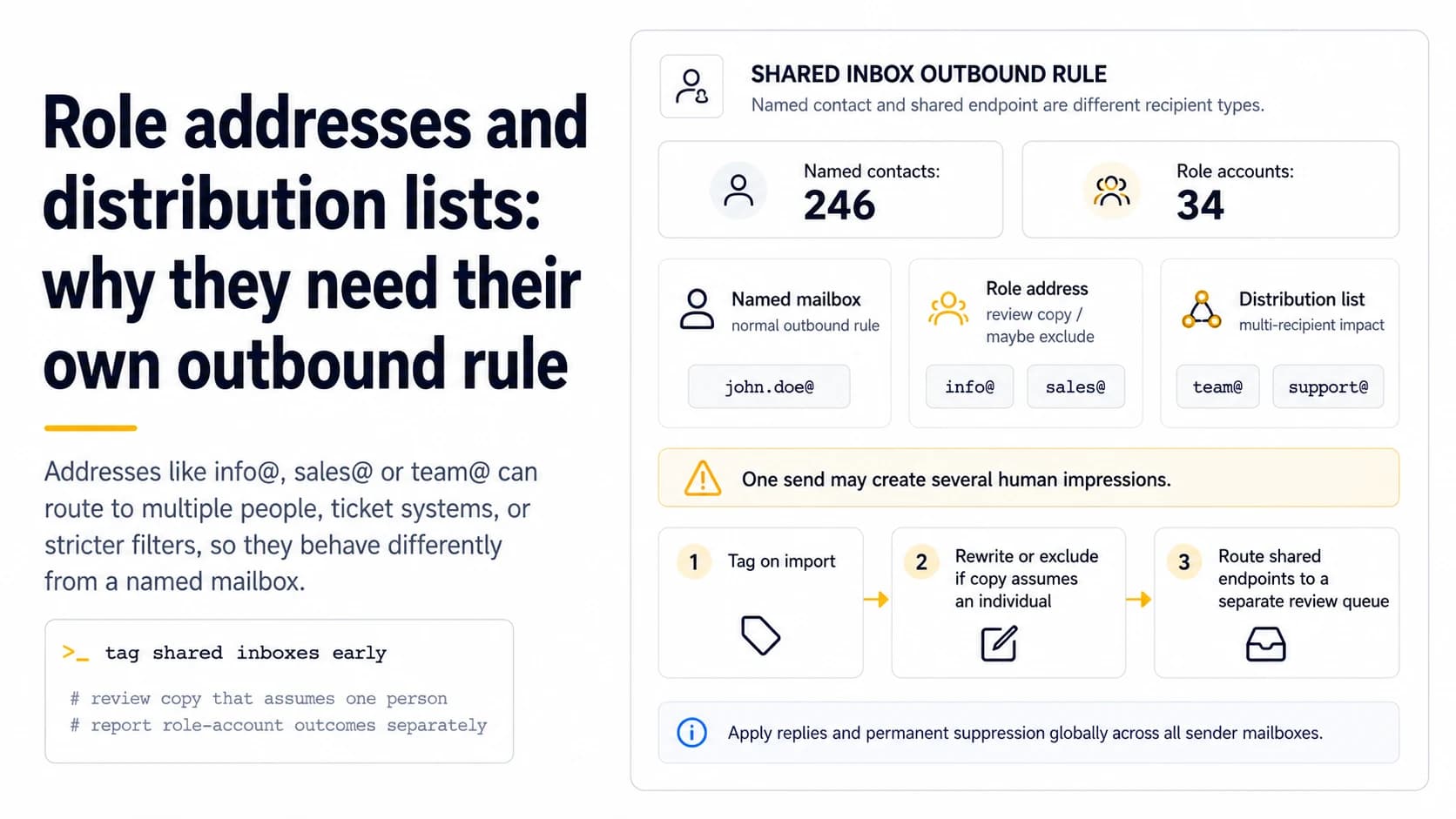
A role address is a different recipient type
Addresses such as `info@`, `sales@`, `support@`, or `team@` may route to multiple people, a ticket system, or a monitored queue. The technical mailbox may be valid while the campaign assumption—one named decision-maker—is false. Tag role addresses during list preparation rather than allowing them to mix silently with person-specific mailboxes. That one field lets copy, follow-up rules, and suppression behavior reflect the recipient type instead of treating every deliverable address as the same kind of endpoint.
Ask whether the message still makes sense without a named person
If the opening line says “I saw your work leading partnerships,” it is inappropriate for `info@` unless the sender genuinely expects a shared inbox to route it. Rewrite or exclude the contact based on intent. Role accounts can be useful when the purpose is naturally team-level—press, billing, general support—but they are often weaker choices for cold prospecting that relies on individual relevance. Deliverability should not be separated from recipient expectation.
Distribution lists can multiply one send into several human impressions
A single address can fan out to several recipients or a departmental list. Your sender sees one SMTP delivery, but multiple people may receive or review the message. That changes the cost of a mistaken follow-up and can amplify complaints. Avoid aggressive sequences to list-like addresses, and stop quickly on any response. If a distribution list rejects external senders or requires membership, store that failure distinctly rather than repeatedly retrying from another mailbox.
Do not infer validity from a generic local part
Common local parts are easy to guess, which is exactly why scraped lists often contain them. A domain having a website does not prove `sales@domain` or `ceo@domain` is active. Apply the same domain, suppression, and mailbox-confidence checks used elsewhere, then keep the role tag. If the source simply generated likely addresses, lower confidence accordingly. A technically accepted role mailbox still may be unmonitored or unrelated to the intended prospect.
Use separate reporting for role-account outcomes
Measure replies, permanent failures, negative responses, and complaints for role accounts separately from named contacts. If 34 role addresses inside a 280-contact file behave differently, the aggregate campaign rate will hide it. Segmented outcomes tell you whether role addresses deserve a narrower use case, stronger source requirements, or exclusion from future prospecting. The decision should come from recipient behavior and campaign purpose, not from a blanket belief that role addresses are always good or always bad.
Central suppression matters even more for shared endpoints
A negative reply or permanent failure from `info@example.com` should suppress that address across all sender mailboxes. Without shared state, another campaign can contact the same department days later from a different account because the CRM views it as a separate sequence. Normalize the address and check suppression immediately before send. Shared inboxes make duplicate-contact mistakes more visible to organizations, so cross-mailbox coordination is essential.
Define a role-address policy before importing the list
Write an explicit rule: which local parts are tagged, which are excluded automatically, which require human review, and which campaigns may include them. Keep exceptions visible rather than hard-coding “never send info@” into a hidden worker. This makes list preparation consistent and auditable. It also stops operators from changing the rule after seeing a poor result and then forgetting what population the earlier metrics represented.
Treat shared endpoints as higher-impact contacts
An address such as sales@, info@ or partnerships@ may be a single shared mailbox, an alias, a ticket system or a distribution list that fans one message out to several people. That means one send can create more human impressions than the sender intended, and a complaint or internal spam report can represent a broader negative reaction. Put role addresses into their own segment and decide whether the message genuinely makes sense without knowing a specific person. For a solo sender, the safest default is usually a lower test volume and stricter relevance standard rather than pretending a syntactically valid role address behaves like a named mailbox.
Do not let a role address re-enter through a second owner
Role endpoints are easy to duplicate because different lead sources can associate the same address with different contacts or departments. The suppression key should therefore include the normalized email address globally, not just the CRM record ID. If info@example.com hard-bounces, unsubscribes, or receives a stop request, another salesperson or mailbox should not be able to import the same address under a different row and restart the sequence. Keep the original reason and timestamp so the team can distinguish a technical permanent failure from an intentional suppression. Shared endpoints amplify the cost of poor deduplication, so the state model needs to be stricter than the contact ownership model.
Detect common role local-parts before mailbox verification
A lightweight role-address classifier can flag local-parts such as info, sales, support, admin, office, hello, contact, careers and billing before deeper mailbox checks. The list should be treated as a heuristic rather than a universal rule because some organizations assign these addresses to individuals. Store the role flag separately from deliverability verification so a technically valid address can still be routed through the stricter role policy. This keeps the business decision visible: the question is not only whether the server accepts the mailbox, but whether sending to a shared endpoint is appropriate for the specific message and campaign.
Route shared addresses through a separate review queue
Instead of silently mixing role addresses into the normal campaign, put them into a review queue with the company, local-part, source and reason the address was selected. A human can quickly decide whether the message is appropriate for that shared endpoint or whether a named contact should be found instead. This adds only a small amount of friction for a solo sender and prevents the highest-impact ambiguous recipients from being treated as ordinary rows. The review outcome should be stored so the same role address is not reconsidered from scratch every time a new list is imported.
Field checklist
- Tag role/local-part patterns during import.
- Exclude or rewrite messages that assume an individual recipient when the inbox is shared.
- Treat distribution lists as potentially multi-recipient endpoints.
- Verify guessed role addresses; do not assume common local parts exist.
- Report role-account outcomes separately from named mailboxes.
- Apply replies and permanent suppression globally across all sender mailboxes.
Primary sources
Standards and provider policies can change. These links are the reference points used for this field note.
- Email sender guidelinesGoogle Gmail Help — Authentication, TLS, DNS, spam-rate and bulk-sender requirements.
- Outlook requirements for high-volume sendersMicrosoft Defender for Office 365 Blog — SPF, DKIM and DMARC requirements for high-volume mail to Outlook.com consumer domains.
- Sender Requirements & RecommendationsYahoo Sender Hub — Yahoo authentication, complaint-rate, DNS, unsubscribe and flow-control requirements and recommendations.