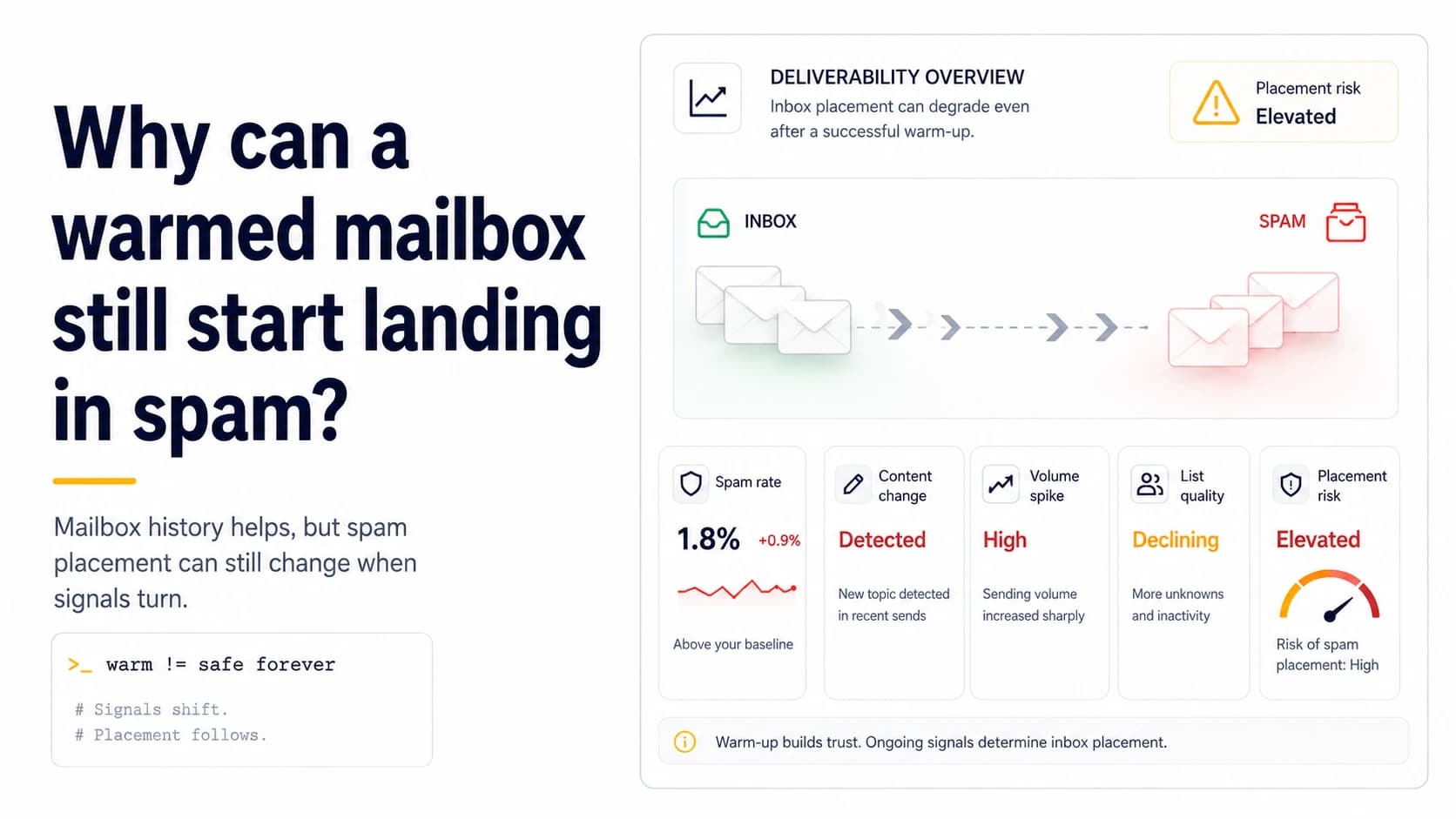
Warmup history cannot override a new failure
A mailbox can operate normally for weeks and then deteriorate quickly after something else changes. Warmup creates recent history; it does not immunize a sender against broken DKIM, a stale list, sudden volume growth, complaint pressure or a provider migration. The first diagnostic question should therefore be temporal: what changed immediately before the visible delivery shift? If a six-week-old mailbox starts behaving differently the day after nameserver changes and a new 400-contact import, both events are stronger leads than the vague conclusion that 'warmup stopped working.'
Use the old healthy period as a baseline
A previously stable mailbox gives you something valuable: known-good evidence. Capture what normal looked like before the problem—authentication results, usual daily range, list source, reply distribution, and hard-bounce count. Then compare the first bad batch. If authentication changed while the list and volume did not, the DNS path deserves priority. If authentication is identical but the new list creates permanent failures, hygiene becomes the better explanation. Baseline comparison is much more useful than buying additional warmup traffic because it narrows the layer that actually changed.
Check message authentication from a fresh send
Do not diagnose a current delivery problem from an old setup screenshot. Send a controlled message, inspect its Authentication-Results and DKIM-Signature headers, and query the authoritative DNS records those values reference. A provider migration can leave an obsolete selector or SPF include in place while the dashboard still looks familiar. DMARC adds alignment: a raw SPF or DKIM pass is not the full test if the authenticated domain no longer aligns with the visible From domain. Repair structural identity failures before testing copy or send timing.
Audit the new list before blaming reputation
A warm mailbox can be damaged by a poor list just as quickly as a new one. Compare hard bounces and uncertain addresses by source. If the new 400-contact file includes stale mailboxes, catch-all domains or repeated role accounts, stop exposing the whole domain to that uncertainty. Re-verify the affected segment, apply global suppression and resume with a smaller clean tranche. The earlier warmup history may help establish a baseline, but it cannot turn invalid recipients into valid ones or make unwanted targeting relevant.
Look for an accidental traffic cliff
Volume often changes in ways the operator did not plan. A retry bug, a new follow-up sequence, or stacking real campaigns on top of background warmup can double traffic without anyone explicitly entering a higher daily limit. Compare planned sends with actual sends at mailbox and domain level. If the bad period begins with a sharp jump, pause expansion and return to the last predictable envelope after other causes are ruled out. Do not use extra warmup messages to 'balance' the spike; that only adds more traffic while the signal is already unstable.
Do not treat spam placement as one universal state
Different receivers can react differently to the same sender. A problem may appear at Gmail while Outlook.com remains normal, or it may concentrate on one recipient domain because of local filtering or rate behavior. Group failures and responses by receiver instead of labeling the entire domain 'in spam.' Google Postmaster data, where available at sufficient volume, can provide useful context, but small senders often need to rely on direct SMTP responses, authentication evidence and controlled test recipients. Provider concentration is a clue about where to look next.
Recover by fixing the cause, then proving stability
Once the cause is identified, make the smallest corrective change and retest below the recent peak. A repaired DKIM selector should be confirmed in fresh headers. A cleaned list should be tested with verified contacts. A volume spike should be followed by a smaller, predictable batch. Keep unrelated variables stable for at least one comparison. Recovery is not complete because one message reached an inbox; it is complete when the system repeats a known-good pattern and the failure that triggered the investigation no longer reproduces.
A low visible complaint rate can still hide poor placement
Google Postmaster Tools warns that a very low user-reported spam rate can be misleading when Gmail is already routing many messages directly to spam, because recipients see fewer of those messages in the inbox and therefore have fewer opportunities to mark them as spam. Low-volume days can also have missing dashboard data for privacy reasons. That means a previously warmed mailbox should not be declared healthy from one attractive percentage. Compare the spam-rate view with domain reputation, delivery errors, authentication success and actual receiver responses. For a small sender, the most useful clue may be a change in the mix of outcomes: more temporary deferrals, fewer real replies from comparable recipients, or a new authentication failure. Treat Postmaster data as one part of the evidence rather than a single green light.
Reconstruct the last known-good configuration before changing copy
When placement degrades, copy is often blamed first because it is visible. Start instead by reconstructing what changed since the mailbox last behaved normally: DNS records, provider, DKIM selector, sending window, total domain traffic, list source, link domain, reply-to handling and suppression state. If nothing structural changed but a new list generated a sudden wave of unknown recipients, the list is a stronger lead than the subject line. If every list segment changed at the same time a provider migration occurred, verify SPF, DKIM and DMARC alignment before rewriting the message. A warmed history does not protect a sender from a new technical fault. Recovery is faster when the investigation follows the change log instead of cycling through speculative content edits.
Check list-source drift before blaming the mailbox
If the mailbox was healthy last week and the only major change is the prospect source, compare the new segment with the previous one. Look at domain age, corporate versus free-mail mix, catch-all share, verification age, role-address share and the number of contacts imported from sources that have never been tested on this domain. A warmed mailbox can still generate poor outcomes when the recipient set suddenly becomes less accurate or less relevant. Run a small control batch from the older verified source if available. If the control behaves normally while the new source produces permanent failures or low-quality responses, the mailbox history is not the leading suspect. Quarantine the new source, re-verify it, and reintroduce only a small tranche after obvious bad rows are removed.
Field checklist
- Compare the first bad batch with a known-good pre-incident baseline.
- Re-test SPF, DKIM, and DMARC alignment from a fresh message after any DNS change.
- Audit list source and hard-bounce concentration before adding more traffic.
- Compare planned and actual sends to find retry or follow-up spikes.
- Group abnormal outcomes by receiver instead of assuming a global state.
- Fix one cause at a time and retest below the recent peak.
Primary sources
Standards and provider policies can change. These links are the reference points used for this field note.
- Email sender guidelinesGoogle Gmail Help — Authentication, TLS, DNS, spam-rate and bulk-sender requirements.
- RFC 6376 — DKIM SignaturesIETF / RFC Editor — DKIM signing and verification behavior.
- RFC 3463 — Enhanced Mail System Status CodesIETF / RFC Editor — 2.x.x, 4.x.x and 5.x.x delivery status code classes.
- Postmaster Tools dashboardsGoogle Gmail Help — Spam-rate, reputation, authentication, encryption and delivery-error dashboard behavior and limitations.