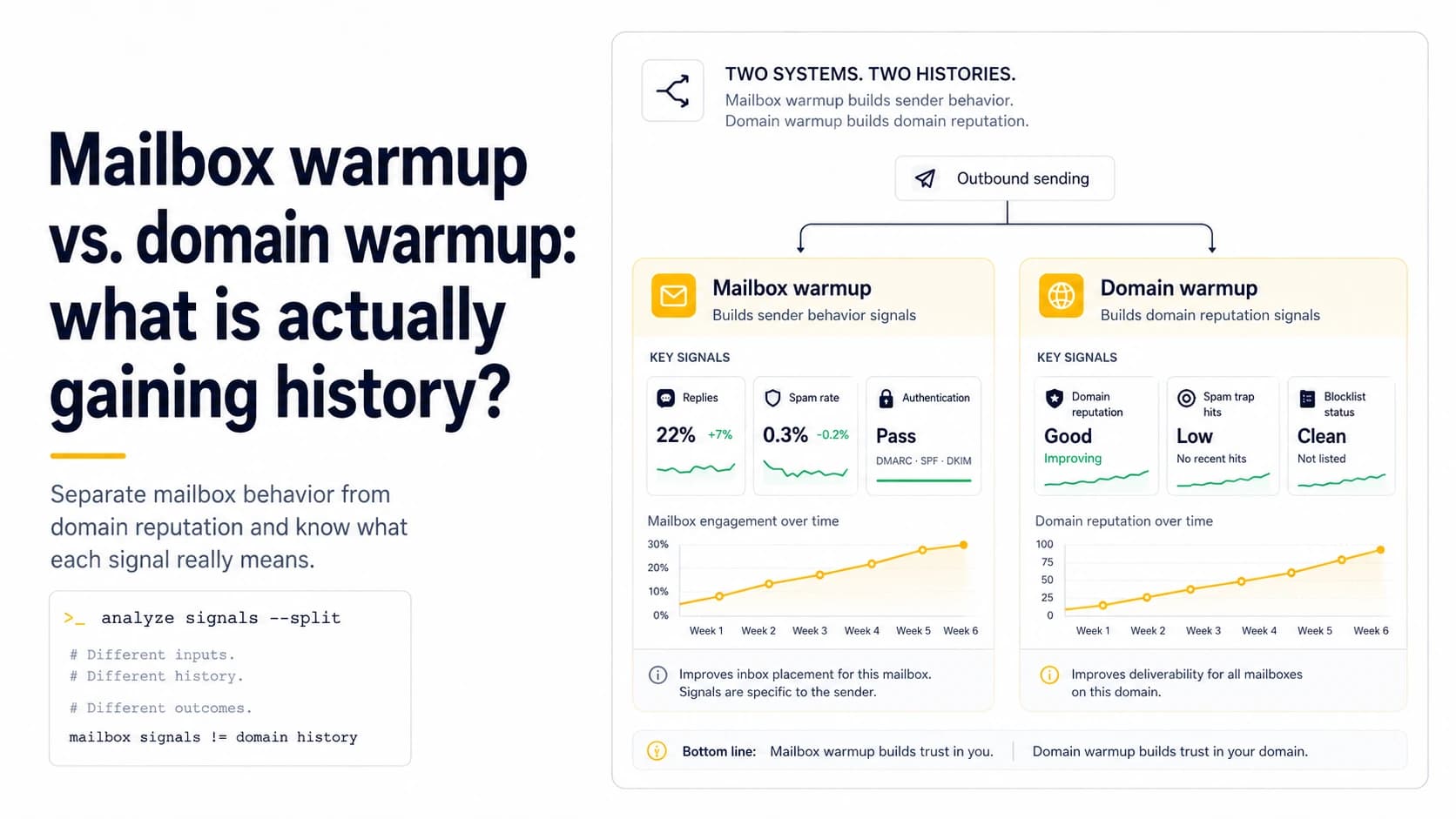
A domain and a mailbox do not have the same history
A sending domain is visible across every address that uses it, while a mailbox has its own provider account, creation date, local behavior, and send pattern. Those scopes overlap, but they are not interchangeable. If three addresses on a domain have sent normal business mail for months and a fourth address was created yesterday, the new mailbox benefits from the domain's established identity and authentication setup, yet it still begins with no personal sending history. That is why copying the daily output of the older mailboxes on day one is a poor test: it changes both mailbox age and per-account behavior at the same moment.
Domain reputation is shared context, not a transferable quota
It is tempting to think of a mature domain as a bank account that grants every new mailbox the same allowance. Reputation systems are not exposed that way. Receivers can observe the From domain, authenticated domains, sending infrastructure and message patterns, while the mailbox provider can enforce its own account limits and abuse controls. A new mailbox on an established domain should therefore start below the established accounts, then move toward their working range only if its own authentication, bounce and reply behavior remains normal. The point is not to distrust the old domain; it is to avoid turning a new mailbox into the largest behavioral change on that domain.
Track both scopes in the same operating sheet
For small outbound systems, keep two counters: sends per mailbox and aggregate sends per domain. Four mailboxes sending 25 messages each still create 100 domain-level messages, even though no individual account looks busy. Record bounces, replies and temporary failures at both levels too. This immediately answers useful questions: is one mailbox abnormal while the others are fine, or did all accounts on the domain change at the same time? If only the new mailbox shows failures, inspect its configuration and provider state. If every mailbox shifts together, a domain, DNS, list or receiver-level cause becomes more plausible.
Authentication can be healthy while the new mailbox is not
A new address can send with perfectly valid SPF, DKIM and DMARC alignment and still deserve a conservative ramp. Authentication proves or supports domain identity; it does not say the mailbox has established a stable volume pattern or that recipients want the messages. Conversely, a long-lived mailbox cannot compensate for broken DKIM after a provider migration. During warmup, treat authentication as a prerequisite that must stay green, then evaluate mailbox behavior separately. This prevents a common analytical mistake in which one successful authentication test is interpreted as evidence that an account is ready for any campaign volume.
Add mailboxes for operational reasons, not to hide volume
Splitting work across several mailboxes can make ownership, reply handling and queue management easier. It should not be used as a way to pretend a domain is sending less than it is. If one domain has five new mailboxes and each is pushed quickly to the same aggressive schedule, the aggregate pattern is still a sharp change. Add capacity gradually, and avoid onboarding every new mailbox on the same day if you cannot distinguish their effects. A small team benefits from knowing exactly which mailbox produced a failure, which list fed it, and whether the same issue appeared elsewhere on the domain.
Use older mailboxes as a baseline, not as instructions
Established mailboxes are useful because they provide a comparison. If an older account sends 30 relevant messages with no authentication errors and the new account receives repeated policy deferrals at 12, the difference is worth investigating. But do not simply copy the older account's schedule. Its history, recipient mix and past behavior are different. Instead, compare common elements: same provider, same domain, same list quality controls and similar time window. A baseline is evidence about what the environment can support under known conditions; it is not a guarantee that a newly created account has inherited the same tolerance.
When to consider the new mailbox operationally established
There is no official day on which a mailbox becomes 'warmed.' A more useful milestone is repeatability: the mailbox can send at the intended working range across several comparable batches while authentication stays valid, permanent failures stay controlled, replies are processed correctly, and the queue does not generate accidental spikes. At that point, the mailbox no longer needs special treatment simply because it is new. Keep monitoring the domain aggregate, because adding several established mailboxes can still change total behavior enough to create a new risk at the domain level.
Use a shared-domain incident to separate the two layers
Suppose one domain has three mailboxes: an older mailbox sending normally, a new mailbox at 12 messages per day, and a third mailbox that was just created. If only the newest mailbox produces authentication failures, the first investigation belongs at the mailbox or provider configuration layer. If all three suddenly receive the same receiver deferrals after a campaign import doubled total traffic, the evidence points toward shared domain behavior or a common sending path. This distinction prevents a common operational mistake: creating another mailbox to route around a domain-level problem. More mailboxes can spread local queue load, but they do not create an independent domain history. Treat the mailbox as the unit for credentials, queue behavior and local errors; treat the domain as the unit for shared authentication identity, aggregate traffic shifts and reputation observations.
A two-level dashboard is enough for a solo operator
You do not need enterprise deliverability software to keep the distinction visible. A small sheet can have one row per mailbox with age, current daily cap, last hard bounce, last temporary deferral and last genuine reply. A second table rolls those same sends up by domain and receiving provider. When a mailbox is added, watch whether domain totals rise even if each mailbox individually looks conservative. When one mailbox is paused, confirm that another worker did not absorb its queued contacts and preserve the same domain-level burst. The objective is attribution: a local problem should be traceable to one mailbox, while a shared change should be obvious across siblings. That makes later recovery decisions much safer because you can lower or stop the layer that actually changed instead of blindly resetting the whole outbound stack.
Field checklist
- Record mailbox creation date separately from domain age.
- Track per-mailbox and aggregate domain volume together.
- Do not copy an older mailbox's daily volume onto a new account automatically.
- Use established mailboxes as comparison baselines, not quota sources.
- Keep authentication checks separate from reputation and volume checks.
- Add new mailboxes gradually so their effects remain attributable.
Primary sources
Standards and provider policies can change. These links are the reference points used for this field note.
- Email sender guidelinesGoogle Gmail Help — Authentication, TLS, DNS, spam-rate and bulk-sender requirements.
- Outlook requirements for high-volume sendersMicrosoft Defender for Office 365 Blog — SPF, DKIM and DMARC requirements for high-volume mail to Outlook.com consumer domains.
- Postmaster Tools dashboardsGoogle Gmail Help — Spam-rate, reputation, authentication, encryption and delivery-error dashboard behavior and limitations.