What warmup is actually trying to change
Warmup is not a ritual that makes a domain trusted after a fixed number of days. It is a controlled way to establish a recent sending pattern without asking receivers to absorb a large behavioral jump. For a new outbound domain, the useful signals are ordinary ones: authentication stays valid, hard bounces remain rare, recipient responses look plausible, and the sending pattern changes gradually rather than in cliffs. The domain and each mailbox are building history at the same time, so the first goal is observability. A five-message batch that exposes a broken DKIM selector is more valuable than a fifty-message batch that hides the same defect inside a larger campaign.
Use a ramp as a plan, not a promise
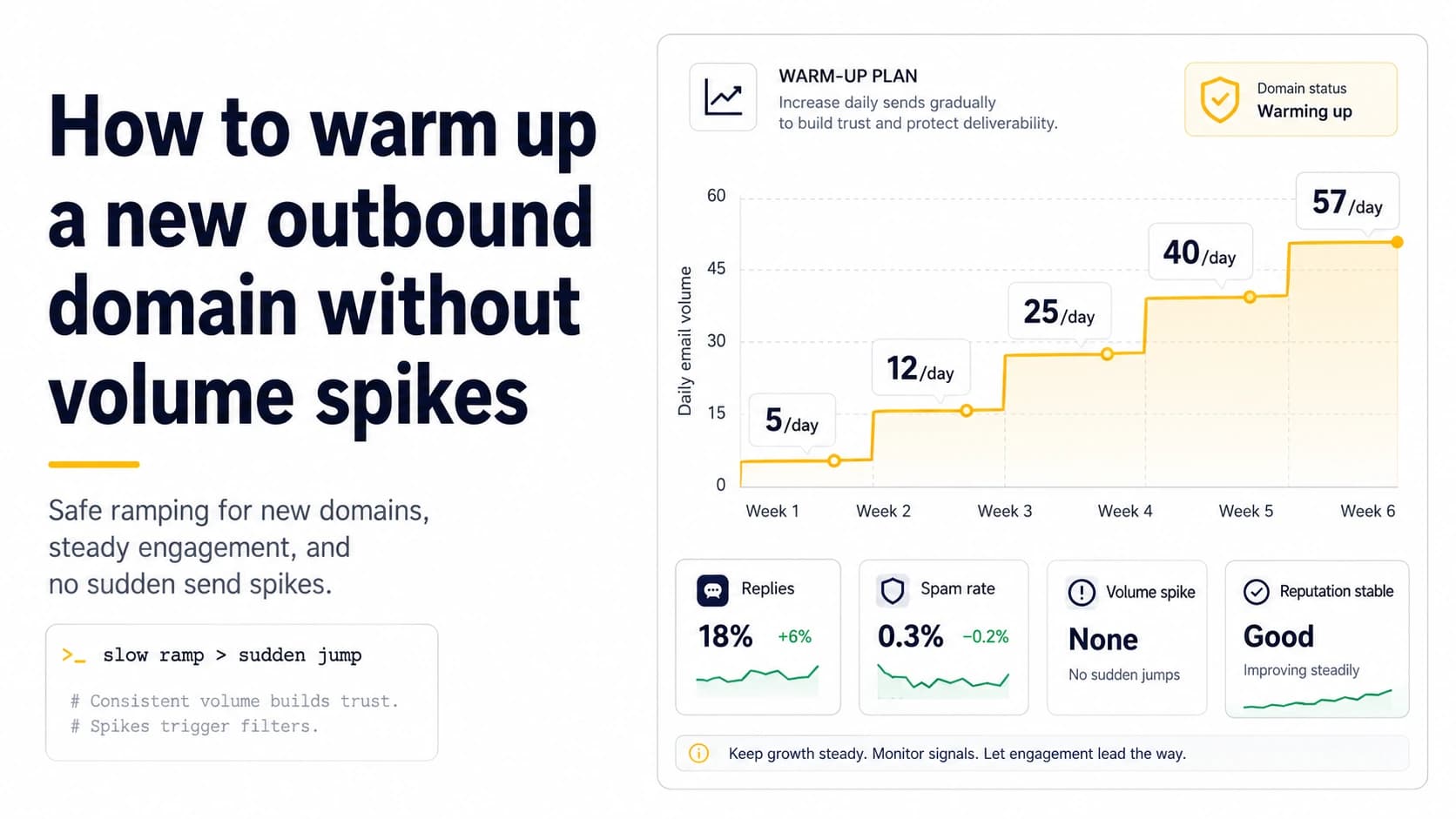
An operating ramp such as 5, 7, 9, 12, 18, 26, 36, 49 and 57 sends can be useful because it forces the sender to make deliberate increases. It is not a provider-published safe schedule, and the next step should never happen automatically just because a date arrived. Write planned sends and actual sends side by side. If a worker retries a queue and the mailbox sends 31 messages when the plan said 18, that difference belongs in the incident log. A ramp is valuable only when it makes unexpected behavior obvious and gives you a known point to return to after a bad batch.
Gate increases on evidence from the prior batch
Before increasing volume, inspect the previous step for authentication failures, permanent address failures, unusual temporary deferrals, complaint signals where available, and real replies. Small senders should look at raw counts as well as percentages. Two hard bounces in ten messages are not statistically elegant, but they are operationally important when the normal baseline is zero. If a negative signal appears, hold the next step and determine whether the problem came from recipient data, DNS, provider policy, or the queue. Increasing while the cause is unknown turns a useful diagnostic event into a larger reputation experiment.
Keep the first real prospect batches deliberately small
Once authentication is confirmed, introduce verified prospects in tranches that are small enough to inspect manually. The objective is not to imitate normal human correspondence perfectly; it is to avoid exposing the entire list before you know how the new domain behaves with real recipients. If the first ten prospect messages produce one invalid address and two genuine replies, you now have both a hygiene action and a response baseline. Suppress the invalid address globally, classify the replies, and keep the next tranche comparable. Do not change the list source, copy, mailbox and send window all at once, because a better result would no longer tell you what improved.
Why sudden volume changes are more dangerous than the exact number
Receivers do not publish a universal cold-email ceiling for a new domain, so a statement such as '40 per day is safe' is false precision. What you can control is the size of the change. Moving from 12 to 18 sends preserves a very different pattern from moving from 12 to 120. The same principle applies after weekends, outages, or long quiet periods: recent behavior matters. Google also tells senders to avoid practices that lead to rate limiting, spam placement, or blocking, and its sender guidance emphasizes authentication and spam-rate control rather than a magic per-mailbox allowance. Treat volume as one variable inside a broader reputation system.
Separate warmup traffic from campaign capacity
A common mistake is to treat warmup volume as extra capacity. Suppose a mailbox is already producing 24 low-risk messages per day and the operator decides that a 30-message prospect campaign is small. If the campaign is added on top, the mailbox suddenly produces 54 messages, more than doubling its visible behavior. A safer transition replaces some of the low-risk traffic with real prospect traffic while keeping the total envelope predictable. This also makes real replies and bounces meaningful sooner. The goal of warmup is to reach a stable operating pattern, not to create a permanent background stream that lets campaign volume expand without accounting for total traffic.
Define a pause and resume rule before launch
Write the stop conditions before the first campaign batch. Pause if authentication breaks, permanent failures jump above the recent baseline, the queue sends materially more than planned, or receiver responses change in a way you cannot explain. When the cause is found, retest with a small verified batch and resume from the last level that behaved normally rather than jumping to the highest planned step. This turns warmup into a repeatable operating procedure. It also keeps the team from rationalizing bad signals after the fact because a calendar says the domain should be 'ready' by now.
A worked ramp with explicit hold points
A practical ramp is easier to operate when every increase has a hold point. Imagine two new mailboxes on the same domain. Mailbox A sends 5, 7, 9, 12 and 18 messages on successive working days; mailbox B starts one day later and follows the same shape. After the 18-message step, one recipient address hard-bounces and Gmail returns one temporary 4.7.28 rate-limit response. The next action is not to move to 26 simply because the spreadsheet says so. Hold both mailboxes at or below the last uneventful level, suppress the bad address, confirm that the queue did not burst, then send a small verified batch. This preserves the diagnostic value of the event. If the rate-limit disappears and authentication stays clean, the operator has evidence for a cautious increase. If it repeats, the ramp has already done its job by making the change visible while the total exposure is still small.
What to record so the ramp remains explainable
For each mailbox, keep planned sends, actual sends, hard bounces, temporary deferrals, replies, and any provider diagnostic code in one row per day. Add a domain-level total beside the mailbox totals because receivers do not see your internal spreadsheet boundaries. Google explicitly warns that unusual sending rates can be temporarily limited, and Yahoo likewise calls out excessive or rapidly increased traffic as a reason for deferral. Those policies do not provide a magic safe number; they reinforce the need to notice abrupt changes. A good operating log therefore answers three questions after every batch: did the system send what was planned, did receivers react differently from the recent baseline, and did any authentication result change? If the answer to the first question is no, fix the scheduler before drawing conclusions about reputation. If the answer to either of the other two is yes, pause long enough to isolate the cause before continuing the ramp.
Field checklist
- Confirm SPF or DKIM before the first ramp step and keep both configured where your provider supports them.
- Track planned sends and actual sends per mailbox and per domain.
- Do not increase after an unexplained hard-bounce, deferral, complaint, or authentication change.
- Introduce verified real prospects in small tranches instead of a single launch batch.
- Replace warmup traffic gradually; do not stack campaign traffic on top without counting total volume.
- Resume from a known-good level after an incident, not from the highest number on the schedule.
Primary sources
Standards and provider policies can change. These links are the reference points used for this field note.
- Email sender guidelinesGoogle Gmail Help — Authentication, TLS, DNS, spam-rate and bulk-sender requirements.
- Email sender guidelines FAQGoogle Gmail Help — Bulk-sender classification, enforcement and DMARC alignment details.
- Gmail SMTP errors and codesGoogle Gmail Help — Temporary and permanent Gmail SMTP errors, including authentication and unusual-rate failures.
- SMTP Error CodesYahoo Sender Hub — Yahoo guidance for temporary deferrals, permanent errors, unknown recipients and traffic-pattern problems.