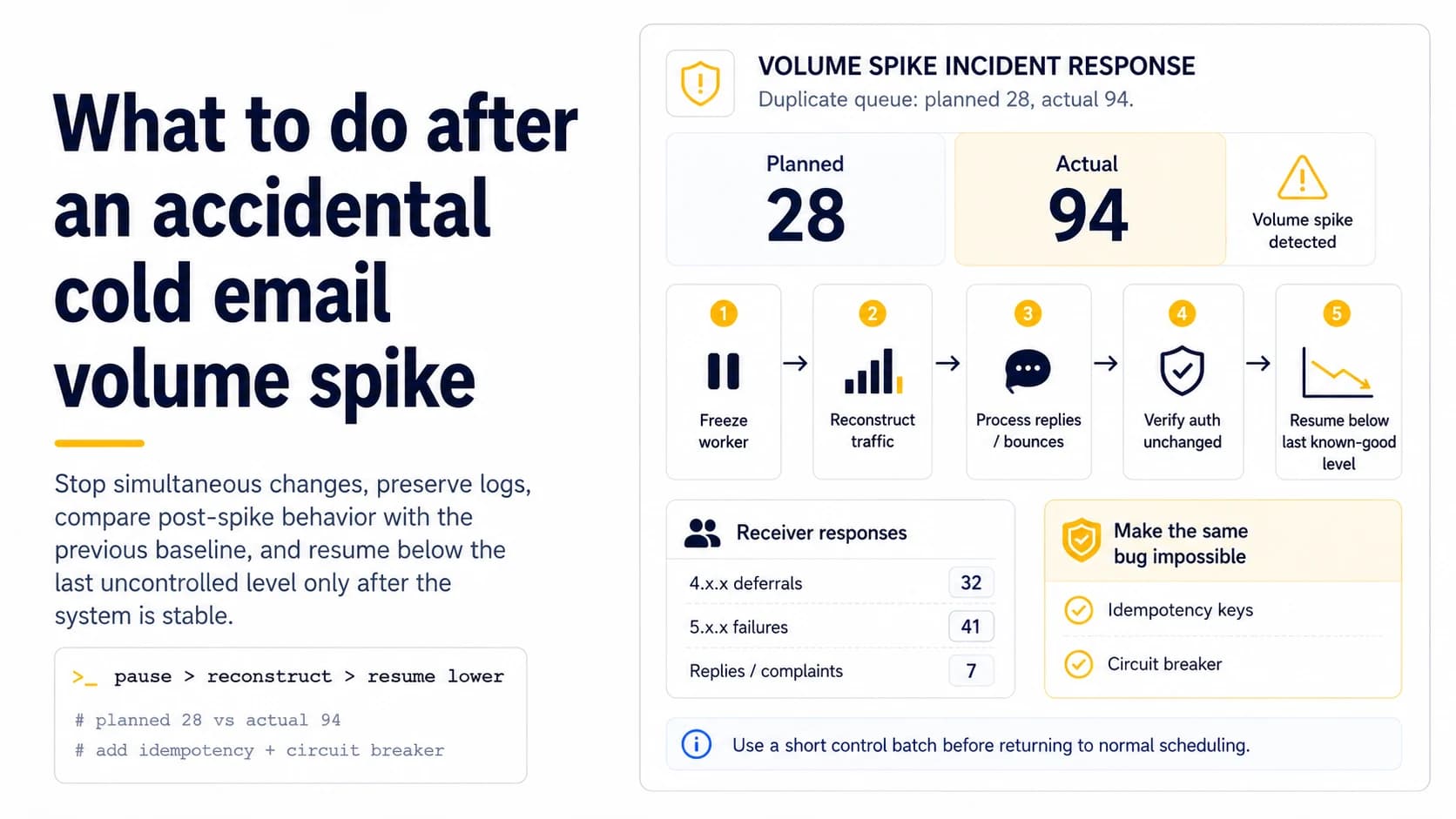
Stop the source of the spike before diagnosing reputation
If a retry bug sends 94 messages instead of the planned 28, the first task is containment. Disable the failing worker, freeze new campaign creation, and prevent duplicate jobs from continuing to drain. Do not add warmup traffic or launch a “small test” while the queue is still uncontrolled. Preserve message IDs, timestamps, sender mailbox, recipient, and job-attempt identifiers before deleting anything. The operator needs to know exactly what left the system, not merely what the campaign dashboard intended to send.
Reconstruct planned versus actual traffic
Build a timeline around the incident: planned messages, actual accepted sends, retries, follow-ups, and any provider-level failures. Deduplicate by a stable send or recipient key so the 94-message total can be split into intended and accidental traffic. Then roll it up by mailbox and domain. This tells you whether one account spiked or the whole domain changed, and whether recipients received duplicate content. The reconstruction becomes the baseline for both technical cleanup and any recipient-state corrections.
Fix contact state before any new outbound
An accidental spike can create new hard bounces, replies, opt-out requests, and duplicate-contact risk. Process those inbound events before resuming. A recipient who replied to the accidental second copy should not receive the next scheduled follow-up because the outbound worker restarted faster than the IMAP processor. Apply permanent suppression globally and cancel duplicate sequence jobs. Recovery begins with accurate state; otherwise the next “normal” batch continues the incident.
Group receiver responses instead of staring at one delivery rate
Separate permanent 5.x.x failures from transient 4.x.x deferrals and group them by recipient provider. If a single receiver begins deferring after the spike while others continue accepting mail, that is different from authentication failures across every provider. Save the exact SMTP text and enhanced status code. A blended dashboard percentage erases the evidence needed to decide whether you have a list problem, a temporary rate response, or a structural authentication change.
Verify authentication did not change during the incident
A queue bug and a DNS change can happen on the same day. Send a controlled test from the affected path and inspect SPF, DKIM, and DMARC alignment. If authentication is broken, repair it before attributing all negative outcomes to volume. If it is unchanged, the spike and recipient response become stronger hypotheses. Keeping these layers separate prevents a common recovery mistake: lowering volume around a configuration error that would reject even a single message.
Resume below the last uncontrolled level
After the worker is fixed, state is reconciled, and authentication is healthy, restart with a small verified batch below the recent peak. Keep the list source and copy stable so the comparison is meaningful. If provider-specific deferrals continue, hold and observe rather than instantly climbing back to the old plan. The objective is to establish a new controlled baseline; trying to “make up” unsent campaign volume is exactly the behavior that can create a second spike.
Add a guardrail that makes the same bug impossible
Post-incident work should change the system, not just the spreadsheet. Add idempotency keys so a retried job cannot send the same message twice, enforce mailbox and domain caps at execution time, and alert when actual output materially exceeds the plan. Consider a circuit breaker that pauses a mailbox after an abnormal count or repeated provider errors. The best deliverability recovery is an outbound architecture that cannot silently turn one queue retry into triple traffic again.
Read provider diagnostics before deciding how long to wait
After a spike, the raw SMTP responses matter more than a generic “delivery rate.” Gmail can temporarily rate-limit traffic with 4.7.28 when it sees an unusual rate, while Yahoo documents temporary deferrals for unusual traffic patterns, complaints or poor reputation. A 4xx response means the receiver is asking the client to try again later; a 5xx response is a permanent negative completion and should not be placed into the same retry loop. Group the incident by receiver and response class. If the spike produced only temporary deferrals and authentication remained valid, the recovery plan may focus on stopping the burst, letting the queue drain slowly and resuming below the previous level. If permanent authentication blocks appeared, time alone is not the fix; DNS or signing must be corrected first.
Add a hard guardrail against the exact failure mode
The recovery is incomplete until the scheduler cannot reproduce the same spike. If a worker retry doubled sends, add an idempotency key or lease so one queued contact cannot be claimed twice. If a restart released a backlog, enforce a rolling send limit independent of cron timing. If several mailboxes all loaded the same daily cap at midnight, stagger allocation and add a domain-level counter. Then simulate the incident with test recipients or a dry-run mode. The most valuable output of a spike is not the temporary reduction in volume; it is the new invariant that converts a previously silent bug into a blocked operation. Reputation can recover only if the system stops recreating the behavior that damaged it.
Use a short control batch before returning to normal scheduling
Once the burst source is fixed, do not refill the entire daily queue immediately. Send a small verified control batch through the same production path and inspect authentication, receiver responses and queue timing. Compare it with the last known-good period rather than with the spike day. If the control behaves normally, resume below the previous stable level and increase only after another uneventful batch. If temporary deferrals continue, keep the domain reduced and avoid feeding the retry queue faster than it drains. A control batch makes recovery measurable and protects the domain from a second incident caused by optimistic catch-up behavior.
Preserve the spike timeline for future incident review
Keep the incident timeline with the domain rather than deleting it after recovery. Record when the spike began, which worker or queue caused it, the highest observed send rate, the main receiver codes, when outbound was paused, and when the first clean control batch succeeded. This gives the next operator a concrete precedent for what the domain experienced and which guardrail fixed it. If a similar rate-limit pattern appears months later, the team can compare the new event with the old one instead of guessing from memory. A short incident record turns a painful mistake into operational evidence.
Field checklist
- Disable the faulty worker and freeze new traffic before testing anything.
- Preserve message-level logs and reconstruct planned versus actual sends.
- Process replies, bounces, and suppressions before restarting outbound.
- Group 4.x.x and 5.x.x outcomes by recipient provider.
- Re-test authentication independently from the volume incident.
- Resume below the spike and add idempotency/circuit-breaker controls.
Primary sources
Standards and provider policies can change. These links are the reference points used for this field note.
- RFC 3463 — Enhanced Mail System Status CodesIETF / RFC Editor — 2.x.x, 4.x.x and 5.x.x delivery status code classes.
- Email sender guidelinesGoogle Gmail Help — Authentication, TLS, DNS, spam-rate and bulk-sender requirements.
- RFC 5321 — Simple Mail Transfer ProtocolIETF / RFC Editor — SMTP reply classes, retry semantics, envelopes and mail transport behavior.
- Gmail SMTP errors and codesGoogle Gmail Help — Temporary and permanent Gmail SMTP errors, including authentication and unusual-rate failures.
- SMTP Error CodesYahoo Sender Hub — Yahoo guidance for temporary deferrals, permanent errors, unknown recipients and traffic-pattern problems.