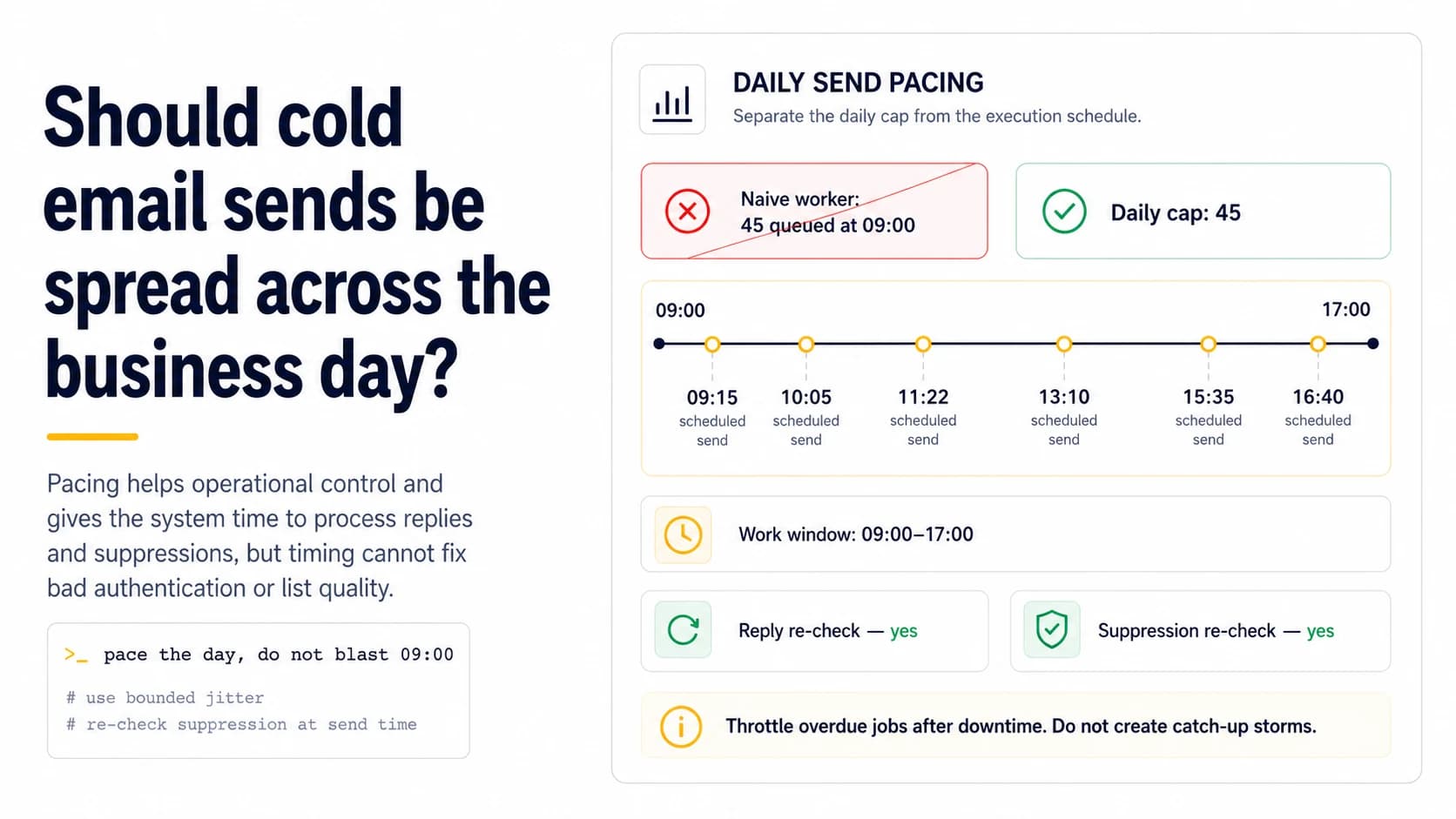
The main benefit is operational pacing, not a magic inbox signal
Spreading messages through a bounded work window prevents a queue from turning a daily target into a minute-long burst. That makes system behavior easier to observe and gives reply or suppression state time to change before later sends. It can also reduce the chance that a provider sees an abrupt local spike. But spacing is not a cure for invalid recipients, broken authentication, or unwanted outreach. Treat scheduling as one control in a healthy system, not as a way to make bad traffic appear human.
Separate a daily cap from a send schedule
A cap answers “how many may leave in this period?” while a schedule answers “when may each one leave?” Keep both. If the daily cap is 36 first touches and nine follow-ups, the scheduler should reserve room for all 45 messages or prioritize them explicitly rather than firing first touches until the limit is exhausted. A naive job that creates every send for 09:00 satisfies the cap on paper while producing a burst. Store each intended execution time and enforce the cap at send time too.
Use bounded jitter instead of identical intervals
Perfectly regular two-minute spacing is easy to implement but unnecessary. A bounded jitter window—for example, selecting the next eligible send within a few minutes—avoids synchronized worker behavior while still respecting business hours. The important property is predictability at the system level: you know the earliest and latest possible send, and the queue never compresses a missed hour into a catch-up burst. Randomness should not be so wide that messages spill into nights or weekends without the operator noticing.
Re-check recipient state immediately before execution
Spacing creates useful time only if the sender uses it. Before each message leaves, re-read the latest contact state: replied, hard bounced, manually suppressed, out-of-office, or still eligible. If a prospect replies at 10:12, a noon follow-up created yesterday must be cancelled. This is especially important for small teams where a human may also mark a contact in another interface. The send-time read turns pacing into a safety mechanism rather than merely a cosmetic delay.
Do not create catch-up storms after downtime
If the worker is offline for two hours, it should not dump every missed job the moment it returns. Define a maximum concurrency or per-window release rate and either reschedule overdue work into the remaining eligible window or move it to the next business day. Catch-up bursts are a common way an otherwise conservative daily plan becomes an accidental spike. Log deferred jobs distinctly so the operator can see that the schedule changed instead of assuming all planned messages left on time.
Account for recipient timezone only when you can do it reliably
For business outreach, a recipient-local work window can improve experience, but guessed timezone data can be worse than a clear campaign-level assumption. Store the timezone source when known; otherwise use an explicit campaign timezone and communicate that operational assumption in the scheduler. Avoid naive local timestamps that change meaning when the worker runs in another region. Timezone-aware scheduling is primarily about avoiding obviously inappropriate hours and preserving consistent state, not about chasing a universal “best send time.”
Measure whether pacing improves control
After introducing paced sends, compare planned versus actual output, queue latency, duplicate rate, late cancellations after replies, and provider deferrals. A good schedule should make these easier to reason about. If messages still cluster because several workers wake on the same minute, fix the queue design. If deferrals continue only at one receiver, investigate that receiver-specific pattern. The scheduler is successful when the operator can predict and stop traffic, not when a chart simply looks less spiky.
Pacing should absorb scheduler retries without creating a burst
A realistic send schedule assumes jobs will fail, workers will restart and queues will occasionally back up. If the system tries to “catch up” every missed send immediately after recovery, a carefully spread day can collapse into a burst. Give each queued message an earliest-send time and enforce a separate rolling limit so restart behavior cannot release the entire backlog. When the remaining business window is too short, carry messages forward rather than compressing intervals. This is an engineering control, not a claim that one exact spacing pattern earns inbox placement. Its value is that actual traffic remains close to the pattern the operator evaluated during previous healthy days, even when the scheduler has a bad hour.
Use recipient timezone only when the data is trustworthy
For small outbound lists, timezone-aware scheduling can improve human relevance, but inaccurate location data can create more complexity than value. If the company location is reliable and the recipient is clearly associated with that office, schedule inside a reasonable local work window. If the location is guessed from a generic domain or stale enrichment record, prefer a consistent sender-side window rather than pretending precision. Keep the timezone decision separate from the deliverability cap: moving a send from 3 p.m. to 10 a.m. should not increase the number of messages the domain emits that day. The strongest operational benefit of pacing is control over traffic shape and last-minute state checks, not a promise that receivers reward a particular clock hour.
Pace follow-ups and first touches from the same domain together
A common scheduling mistake is to spread new first-touch messages evenly while a separate follow-up worker releases its own batch at the top of the hour. The receiver sees the combined domain traffic, not two tidy internal queues. Build one domain-level pacing layer that accounts for first touches, follow-ups and any other outbound message class. Priority can still differ—for example, a reply-related operational message may outrank a new prospect—but the total envelope should remain visible. This prevents hidden secondary queues from turning a smooth day into repeated spikes and makes actual send timestamps useful during later diagnosis.
Field checklist
- Store both a daily cap and per-message execution time.
- Use a bounded work window and modest jitter, not a one-minute blast.
- Re-check reply and suppression state immediately before send.
- Throttle or reschedule overdue jobs after worker downtime instead of catching up instantly.
- Use timezone-aware timestamps and record the timezone assumption.
- Compare planned versus actual pacing and provider deferrals after rollout.
Primary sources
Standards and provider policies can change. These links are the reference points used for this field note.
- Email sender guidelinesGoogle Gmail Help — Authentication, TLS, DNS, spam-rate and bulk-sender requirements.
- RFC 9051 — IMAP4rev2IETF / RFC Editor — Mailbox flags, UIDs, BODY.PEEK and IMAP4rev2 behavior.
- Gmail SMTP errors and codesGoogle Gmail Help — Temporary and permanent Gmail SMTP errors, including authentication and unusual-rate failures.
- SMTP Error CodesYahoo Sender Hub — Yahoo guidance for temporary deferrals, permanent errors, unknown recipients and traffic-pattern problems.