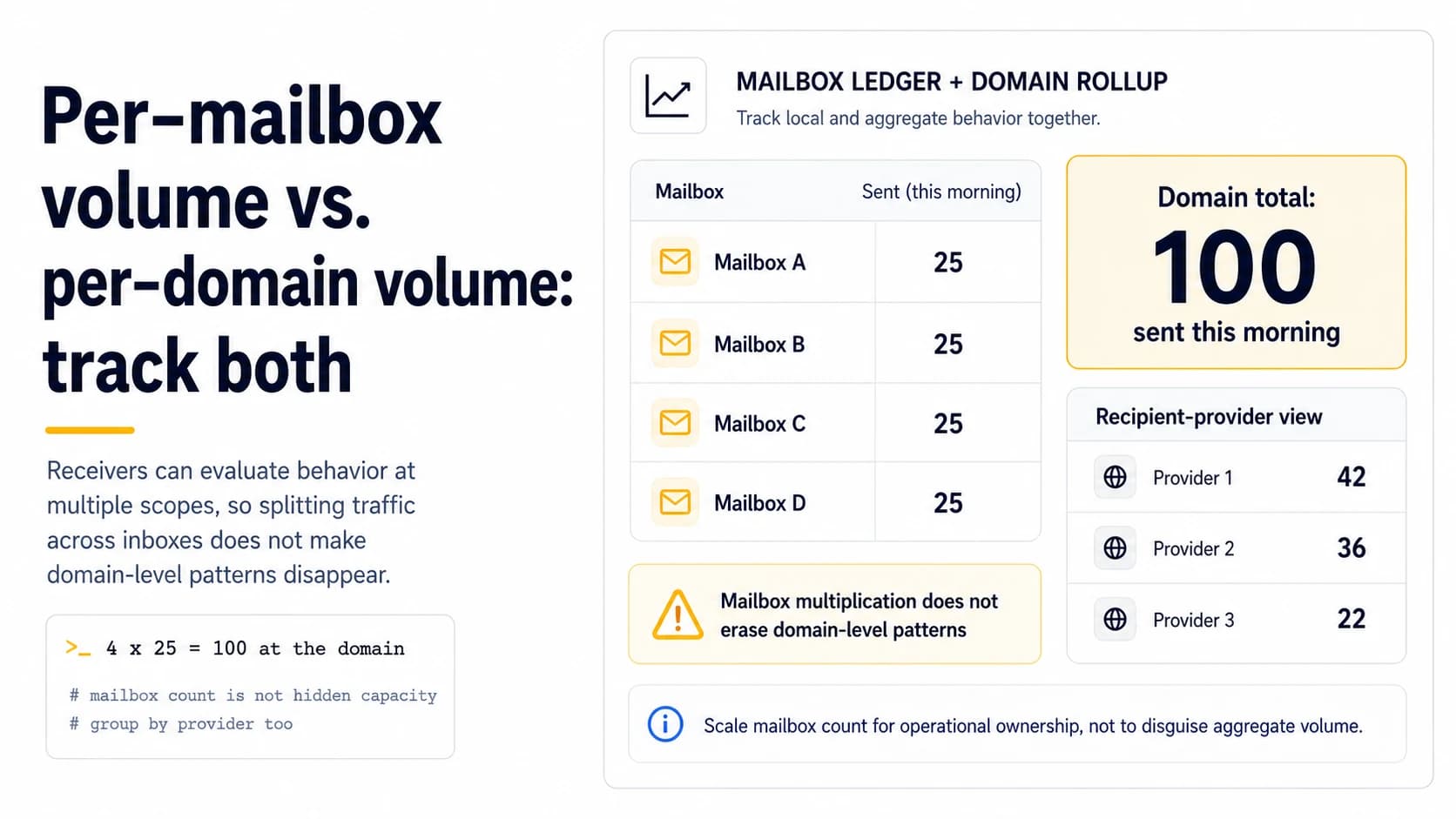
Why one counter is not enough
A mailbox is an operational account, while a domain is a shared identity visible across multiple senders. Four mailboxes each sending 25 prospect messages may look conservative in an inbox-level report, but the domain still emits 100 similar messages. Receiver and mailbox-provider systems can evaluate behavior at different scopes, so distributing work does not make aggregate patterns disappear. For a small outbound setup, tracking both counters costs almost nothing and prevents the most common scaling illusion: “we only send 25 per inbox” when the domain changed dramatically.
Keep a per-mailbox ledger for local problems
Mailbox-level counts help find account-specific defects. Record planned sends, actual sends, bounces, deferrals, replies, and provider errors by sender address. If one account begins returning authentication failures while the others remain normal, inspect its connection, signer, or account state before blaming the domain. A new mailbox can also deserve a gentler ramp even when sibling accounts are mature. This view answers: which account changed, and was the change unique to it?
Keep a domain rollup for shared behavior
Aggregate the same events by visible sending domain and, when useful, by authenticated domain. Include all outbound mailboxes that contribute to the prospecting pattern. If three accounts are onboarded on the same Monday, their combined ramp should be deliberate rather than three independent spreadsheets that accidentally triple domain traffic. The domain view also makes list-wide incidents visible: if every mailbox receives hard bounces after the same CSV import, the shared data source is a stronger suspect than three simultaneous account failures.
Do not use mailbox multiplication to manufacture capacity
Creating more accounts can improve workload ownership and reply handling, but it should not be treated as a method for bypassing provider or receiver controls. If one mailbox cannot safely support a campaign because targeting is poor, ten mailboxes will expose the same poor targeting to more recipients. Scale accounts when there is an operational reason, then ramp aggregate traffic and monitor it. This keeps architecture aligned with real work instead of turning the mailbox count itself into a deliverability tactic.
Stagger changes so failures remain attributable
If you add two mailboxes, switch copy, import a new list, and double domain volume on the same day, a later decline has four plausible causes. Stagger major changes. Bring one mailbox into a small production tranche while established accounts stay stable, then compare. When the new account behaves normally, add the next change. This controlled sequence is slower than flipping everything at once but much faster than diagnosing a domain-wide problem with no known-good reference.
Use receiver grouping as a third view
Mailbox and domain are not the only useful dimensions. Group results by recipient provider or domain as well. A sudden concentration of 4.x.x deferrals at one receiver may indicate a provider-specific condition even when aggregate domain numbers look acceptable. Conversely, failures across many providers immediately after a DNS change point back toward sender infrastructure. Three simple pivots—sender mailbox, sender domain, recipient provider—give a solo operator enough structure to avoid most dashboard-level guesswork.
A practical table for 100 daily messages
Imagine four mailboxes with planned volumes of 20, 20, 25, and 25 plus ten scheduled follow-ups. The mailbox view must show the follow-ups in the account totals; the domain view must show all 100 messages; the recipient view should show where those messages landed. If one account unexpectedly retries 15 jobs, the domain total becomes 115 even though the campaign plan still says 100. That discrepancy is the operational signal to fix before any new volume is added.
Add receiving-domain totals when several mailboxes share one sender domain
Per-mailbox and per-domain counters answer different questions, but a third view can expose concentration risk: how much of the domain’s traffic is going to the same receiving network in a short window. Three mailboxes sending 20 messages each may look modest locally, yet if 50 of the 60 recipients are Gmail accounts in one hour, Gmail observes a much more concentrated pattern than the mailbox counters imply. The goal is not to reverse-engineer an exact receiver threshold. It is to avoid letting internal sharding hide a burst that is obvious externally. Roll up sends by sender domain, mailbox and broad receiver family, then compare actual timestamps with the intended pacing. This makes it harder for parallel workers to create a traffic cliff accidentally.
Capacity belongs to the whole operating system, not mailbox count
Adding mailboxes is sometimes necessary for reply ownership or workload separation, but it should not be treated as a mathematical way to multiply safe volume. If one domain has four mailboxes and each is given a 30-message cap, the domain can emit 120 messages even though no test ever established that shared pattern. Instead, set a domain envelope first and allocate portions to mailboxes inside it. When a new mailbox is introduced, initially redistribute the envelope rather than increasing it. If production outcomes remain stable, increase the domain envelope through the same health-gated process used for any other traffic change. This preserves attribution and prevents mailbox creation from silently bypassing the controls that made the original ramp safe.
Track reallocation when one mailbox is paused
When one mailbox is paused for a local issue, the queue should not silently push its contacts into sibling mailboxes and preserve the same domain total. Record the planned allocation by mailbox and the domain envelope before the day begins. If mailbox B is disabled, either reduce the domain total or explicitly reallocate only after checking that the remaining mailboxes can absorb the change without a traffic cliff. This matters because a domain-level burst can be created by a well-intentioned failover rule even though every mailbox remains under its own local cap. Capacity planning should therefore include what happens during failure, not only the steady-state spreadsheet.
Field checklist
- Track planned and actual sends by mailbox.
- Roll all outbound mailboxes into a domain-level total.
- Include follow-ups, retries, and warmup traffic in total behavior when relevant.
- Stagger new mailboxes and major campaign changes so causes remain attributable.
- Group failures by recipient provider in addition to sender scope.
- Scale mailbox count for operational ownership, not to disguise aggregate volume.
Primary sources
Standards and provider policies can change. These links are the reference points used for this field note.
- Email sender guidelines FAQGoogle Gmail Help — Bulk-sender classification, enforcement and DMARC alignment details.
- Outlook requirements for high-volume sendersMicrosoft Defender for Office 365 Blog — SPF, DKIM and DMARC requirements for high-volume mail to Outlook.com consumer domains.
- Postmaster Tools dashboardsGoogle Gmail Help — Spam-rate, reputation, authentication, encryption and delivery-error dashboard behavior and limitations.